
📍
Bolt Help / Dashboard / Checkout Settings / P.O. Box Restrictions
This feature disables shipment to P.O. Box addresses during checkout.
About
Bolt provides a setting to disable shipment to P.O. boxes on the Bolt Merchant Dashboard via [Checkout Settings][2].
Availability
| Product | Supported |
|---|---|
| Checkout | Yes. |
| Embeddable Checkout | Yes. |
Enablement
- Log in to the Bolt Merchant Dashboard.
- Navigate to Checkout > Configuration.
- Scroll to Checkout settings and open Shipping & Delivery.
- Turn Allow shipping to PO boxes on or off.
- Select Save.
Behavior
Checkout
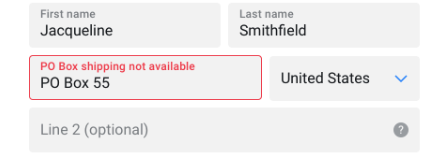
Shoppers who attempt to ship to a restricted location receive the following error message:
Embeddable Checkout
Addresses that do not satisfy the configured requirements are omitted from API responses.